基于PAP认证的公司与分部安全互联
1.项目背景
Jan16公司因业务发展,建立了分公司,租用了专门的线路用于总部与分公司的连联。为保障通信线路的数据安全,需在路由器上配置安全认证。项目 拓扑如图1所示。具体要求如下:
- 公司总部路由器R1使用S4/0/0接口与分公司路由器R2互联;
- R1的S4/0/0接口上使用PPP协议并启用PAP认证,用于分公司的安全接入;
- 测试计算机和路由器的IP与接口信息如拓扑所示。
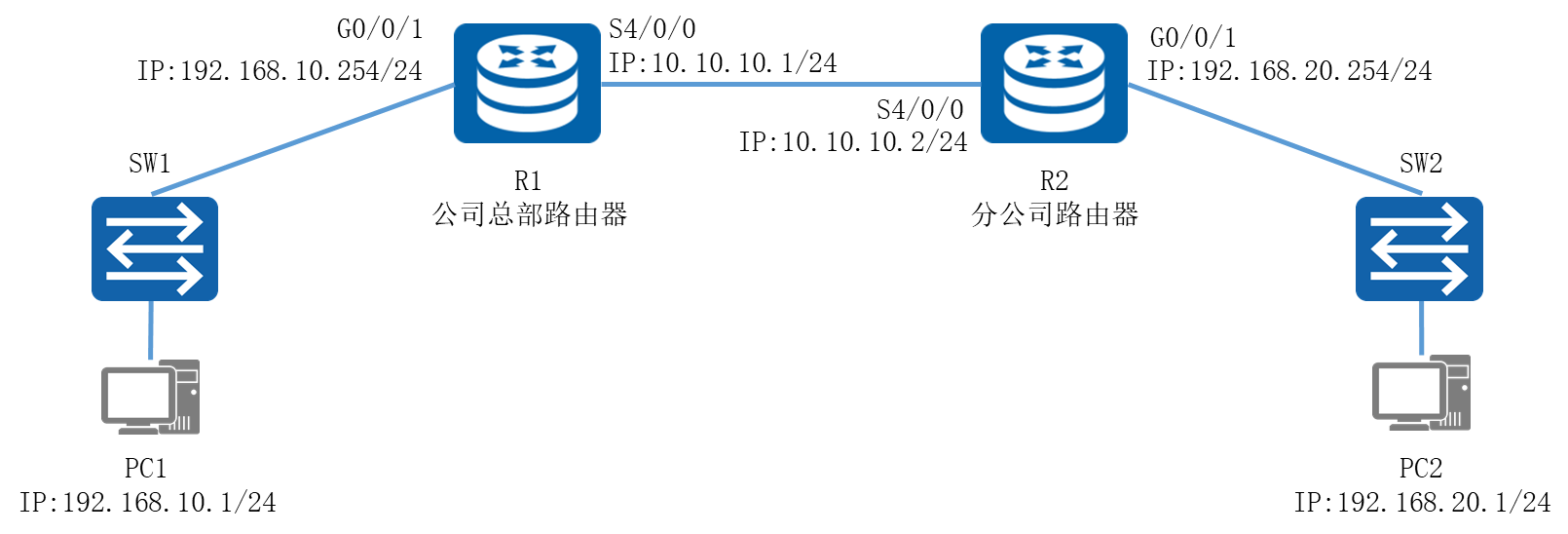
图1 网络拓扑图
2.项目规划设计
串行链路默认采用PPP封装协议,可以通过PAP认证使链路的建立更安全。PAP认证通过用户名和密码进行验证。公司总部路由器R1作为认证方,需在AAA视图下添加名为Jan16的Local-user用户,密码为123456,并将接口S4/0/0的认证方式设置为PAP;分公司路由器R2为被认证方,需在接口上配置PAP的认证方式,并添加与认证方一致的用户名和密码,即可实现链路的认证接入。
配置步骤如下:
- 配置路由器接口
- 搭建OSPF网络
- 配置PPP的PAP认证
- 对端配置PAP验证
- 配置各计算机的IP地址
具体规划如下表:
表1 IP地址规划表
设备 |
接口 |
IP地址 |
R1 |
G0/0/0 |
192.168.10.254/24 |
R1 |
S4/0/0 |
10.10.10.1/24 |
R2 |
G0/0/0 |
192.168.20.254/24 |
R2 |
S4/0/0 |
10.10.10.2/24 |
PC1 |
E0/0/1 |
192.168.10.1/24 |
PC2 |
E0/0/1 |
192.168.20.1/24 |
表2 接口规划表
本端设备 |
接口 |
端口IP地址 |
对端设备 |
R1 |
G0/0/0 |
192.168.1.254 |
SW1 |
R1 |
S4/0/0 |
10.10.10.1/24 |
R1 |
R2 |
G0/0/0 |
192.168.20.254/24 |
SW2 |
R2 |
S4/0/0 |
10.10.10.2/24 |
R2 |
3.项目实施
(1)前面基础配置省略
(2)配置PPP的PAP认证
R1路由器作为认证端,需要配置本端PPP协议的认证方式为PAP。执行aaa命令,进入AAA视图,配置PAP认证所使用的用户名密码。
|
[R1]aaa [R1-aaa]local-user Jan16 password cipher 123456 [R1-aaa]local-user Jan16 service-type ppp [R1-aaa]int s4/0/0 [R1-Serial4/0/0]link-protocol ppp [R1-Serial4/0/0]ppp authentication-mode pap |
配置完成后,关闭R1与R2相连接口一段时间后再打开,使R1与R2间的链路重新协商,并检查链路状态和连通性。
|
[R1]interface Serial 4/0/0 [R1-Serial4/0/0]shutdown [R1-Serial4/0/0]undo shutdown [R1]dis ip interface brief *down: administratively down ^down: standby (l): loopback (s): spoofing The number of interface that is UP in Physical is 3 The number of interface that is DOWN in Physical is 3 The number of interface that is UP in Protocol is 2 The number of interface that is DOWN in Protocol is 4 Interface IP Address/Mask Physical Protocol GigabitEthernet0/0/0 unassigned down down GigabitEthernet0/0/1 192.168.10.254/24 up up GigabitEthernet0/0/2 unassigned down down NULL0 unassigned up up(s) Serial4/0/0 10.10.10.1/24 up down Serial4/0/1 unassigned down down [R1]ping 10.10.10.2 PING 10.10.10.2: 56 data bytes, press CTRL_C to break Request time out Request time out Request time out Request time out Request time out --- 10.10.10.2 ping statistics --- 5 packet(s) transmitted 0 packet(s) received 100.00% packet loss |
可以观察到,现在R1和R2间无法正常通信,链路物理状态正常,但是链路层协议状态不正常。这是因为此时PPP链路上的PAP认证未通过。
(4)对端配置PAP验证
R2作为被认证端,在S4/0/0接口下配置以PAP方式验证时本地发送的PAP用户名和密码。
|
[R2]int s4/0/0 [R2-Serial4/0/0]link-protocol ppp [R2-Serial4/0/0]ppp pap local-user Jan16 password cipher 123456 |
(5)配置各计算机的IP地址
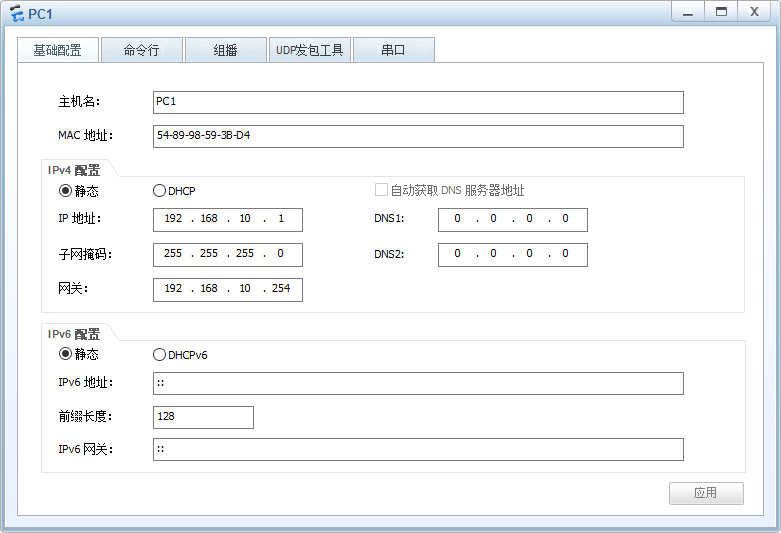
图2 PC1 IP配置图
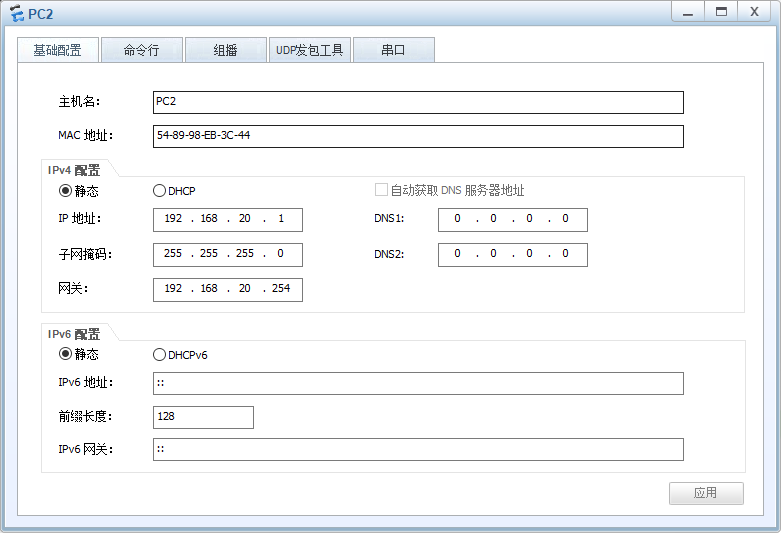
图3 PC2 IP配置图
4.项目验证
(1)查看链路状态
- R2的配置
|
[R2]dis ip int brief *down: administratively down ^down: standby (l): loopback (s): spoofing The number of interface that is UP in Physical is 3 The number of interface that is DOWN in Physical is 3 The number of interface that is UP in Protocol is 3 The number of interface that is DOWN in Protocol is 3 Interface IP Address/Mask Physical Protocol GigabitEthernet0/0/0 unassigned down down GigabitEthernet0/0/1 192.168.20.254/24 up up GigabitEthernet0/0/2 unassigned down down NULL0 unassigned up up(s) Serial4/0/0 10.10.10.2/24 up up Serial4/0/1 unassigned down down |
可以观察到,现在R1与R2间的链路层协议状态正常
(2)测试各计算机的互通性
使用PC1计算机Ping PC2计算机:
|
PC>ping 192.168.20.1 Ping 192.168.20.1: 32 data bytes, Press Ctrl_C to break From 192.168.20.1: bytes=32 seq=1 ttl=126 time=63 ms From 192.168.20.1: bytes=32 seq=2 ttl=126 time=78 ms From 192.168.20.1: bytes=32 seq=3 ttl=126 time=62 ms From 192.168.20.1: bytes=32 seq=4 ttl=126 time=47 ms From 192.168.20.1: bytes=32 seq=5 ttl=126 time=63 ms --- 192.168.20.1 ping statistics --- 5 packet(s) transmitted 5 packet(s) received 0.00% packet loss round-trip min/avg/max = 47/62/78 ms |
可以观察到,PC间正常通信。