Jan16公司基于VRRP的负载均衡出口链路配置
1.项目背景
Jan16公司采用ISP-A、ISP-B作为互联网接入服务商,通过出口路由器R1、R2连接,通过VRRP功能实现了路由器的主备自动切换。由于公司业务的开展,原来的主备链路模式无法满足出口带宽的需求,现需更改为负载均衡模式,在出口链路互为备份的同时还能分流出口流量,增加出口带宽。公司拓扑如图1所示,项目具体要求如下:
- 路由器R1和R2通过拨号方式接入到ISP网络R3和R4,R5是互联网的一台路由器;
- 公司要求配置部分计算机从R1访问Internet,部分计算机从R2访问Internet,且要求当R1或R2链路故障时,自动切换到无故障链路上,既保障充分利用出口流量还能在出现链路故障时确保网络的连通性。
- 路由器间采用OSPF动态路由协议互联;
- 拓扑测试计算机和路由器的IP和接口信息如拓扑所示。
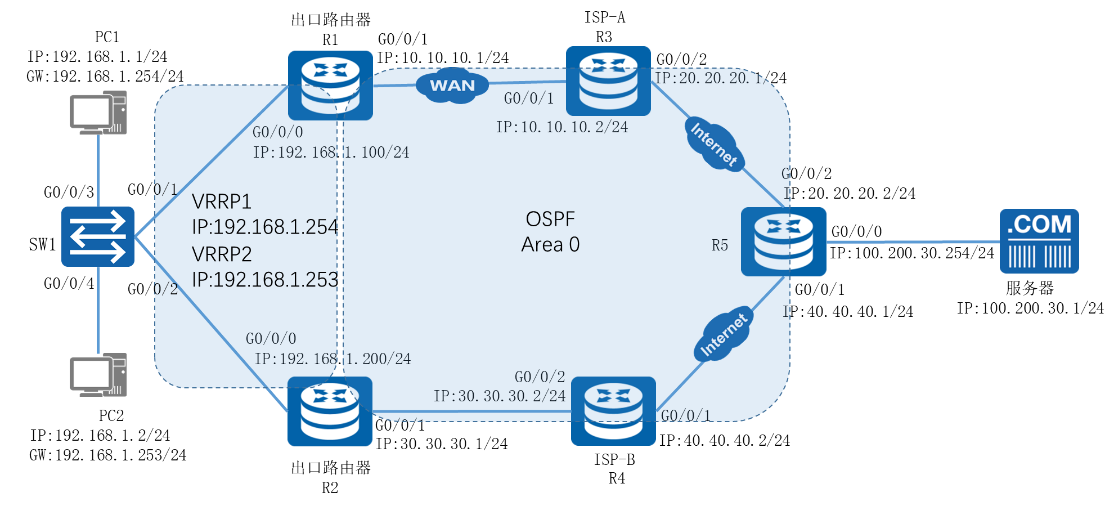
图1-1 网络拓扑图
2.项目规划设计
为实现双出口的流量负载均衡,可以为不同的计算机指定不同的网关,使内部流量能通过不同的出口路由器进行转发。网关可以使用多个VRRP组来实现,并通过设置VRRP组中不同路由器的优先级,可使不同的虚拟网关以不同的路由器作为主路由器,另一个作为备份路由器,即可实现流量的分流和链路的备份。
公司有开发部和市场部2个部门,IP地址段分别为192.168.1.1-10/24和192.168.1.11-20/24,可以为不同的部门指定不同的出口网关以实现均衡流量。在R1、R2上创建VRRP1和VRRP2,并创建虚拟网关地址192.168.1.253和192.168.1.254分别用于开发部和市场部的默认网关。其中VRRP1的主路由器为R1,即R1的VRRP1优先级为110,R2的优先级不变;VRRP2的主路由器为R2,即R2的VRRP2优先级为110,R1的优先级不变,这样即可实现流量的负载均衡。同时,配置对R1、R2路由器上联接口的链路状态跟踪,当上联接口的链路状态为DOWN时,VRRP主路由器优先级下降至50,此时备份路由器即可切换为主路由器,实现自动的主备链路切换。在互联网连接方面,由于ISP-A、ISP-B均采用OSPF协议,故所有路由器均配置OSPF协议,并设置为Area0区域,以实现路由器之间的通信。
配置步骤如下。
(1)配置路由器接口
(2)部署OSPF网络
(3)配置VRRP协议
(4)配置上行接口监视
(5)配置各部门计算机的IP地址
项目规划如表1-1~表1-3所示。
表1 IP地址规划表
设备 |
接口 |
IP地址 |
R1 |
G0/0/0 |
192.168.1.100/24 |
R1 |
G0/0/1 |
10.10.10.1/24 |
R2 |
G0/0/0 |
192.168.1.200/24 |
R2 |
G0/0/1 |
30.30.30.1/24 |
R3 |
G0/0/1 |
10.10.10.2/24 |
R3 |
G0/0/2 |
20.20.20.2/24 |
R4 |
G0/0/1 |
40.40.40.2/24 |
R4 |
G0/0/2 |
30.30.30.2/24 |
R5 |
G0/0/0 |
100.200.30.2/24 |
R5 |
G0/0/1 |
40.40.40.1/24 |
R5 |
G0/0/2 |
20.20.20.1/24 |
3.项目实施
(1)配置略
(2)配置各部门计算机的IP地址
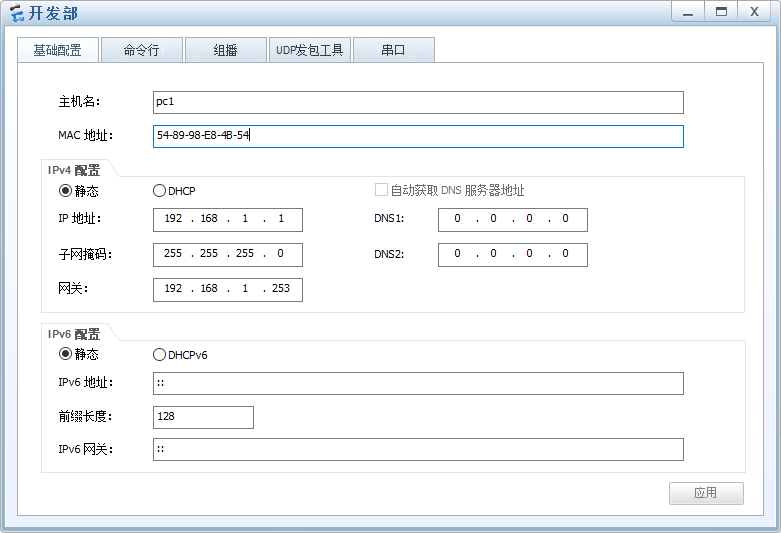
图1-2 开发部 IP配置图
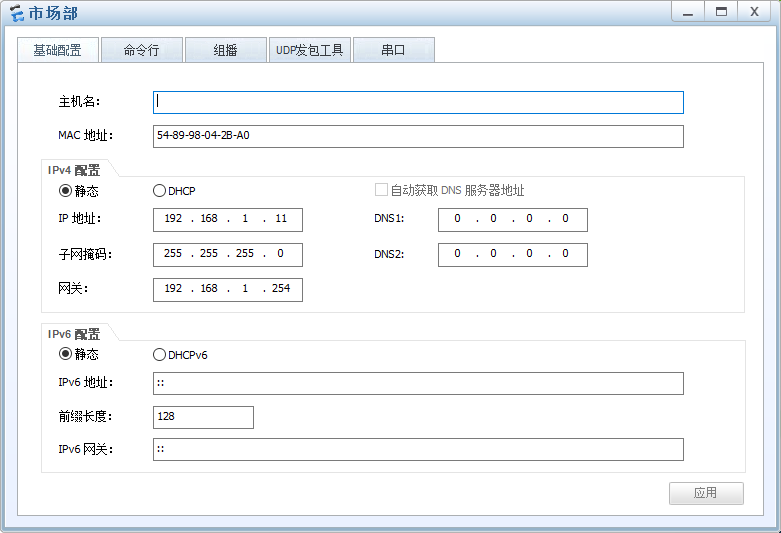
图1-3 市场部 IP配置图
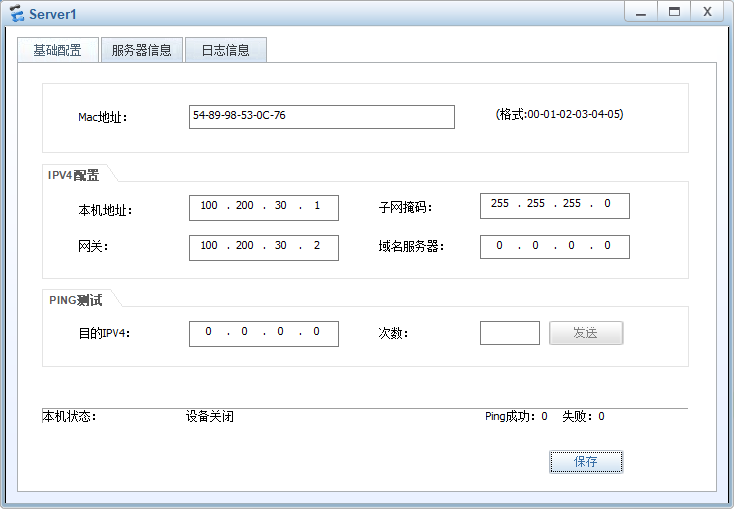
图1-4 服务器 IP配置图
4.项目验证
(1)验证路由器上OSPF邻居建立信息
- R1的配置
|
[R1]dis ospf peer brief OSPF Process 1 with Router ID 192.168.1.100 Peer Statistic Information ---------------------------------------------------------------------------- Area Id Interface Neighbor id State 0.0.0.0 GigabitEthernet0/0/0 192.168.1.200 Full 0.0.0.0 GigabitEthernet0/0/1 10.10.10.2 Full ---------------------------------------------------------------------------- |
- R2的配置
|
<R2>dis ospf peer brief OSPF Process 1 with Router ID 192.168.1.200 Peer Statistic Information ---------------------------------------------------------------------------- Area Id Interface Neighbor id State 0.0.0.0 GigabitEthernet0/0/0 192.168.1.100 Full 0.0.0.0 GigabitEthernet0/0/2 40.40.40.2 Full ---------------------------------------------------------------------------- |
- R3的配置
|
<R3>dis ospf peer brief OSPF Process 1 with Router ID 10.10.10.2 Peer Statistic Information ---------------------------------------------------------------------------- Area Id Interface Neighbor id State 0.0.0.0 GigabitEthernet0/0/1 192.168.1.100 Full 0.0.0.0 GigabitEthernet0/0/2 100.200.30.2 Full ---------------------------------------------------------------------------- |
- R4的配置
|
<R4>dis ospf peer brief OSPF Process 1 with Router ID 40.40.40.2 Peer Statistic Information ---------------------------------------------------------------------------- Area Id Interface Neighbor id State 0.0.0.0 GigabitEthernet0/0/1 100.200.30.2 Full 0.0.0.0 GigabitEthernet0/0/2 192.168.1.200 Full ---------------------------------------------------------------------------- |
- R5的配置
|
<R5>dis ospf peer brief OSPF Process 1 with Router ID 100.200.30.2 Peer Statistic Information ---------------------------------------------------------------------------- Area Id Interface Neighbor id State 0.0.0.0 GigabitEthernet0/0/1 40.40.40.2 Full 0.0.0.0 GigabitEthernet0/0/2 10.10.10.2 Full ---------------------------------------------------------------------------- |
(2)验证路由器R1、R2的VRRP信息
- R1的配置
|
<R1>dis vrrp GigabitEthernet0/0/0 | Virtual Router 1 State : Master Virtual IP : 192.168.1.253 Master IP : 192.168.1.100 PriorityRun : 110 PriorityConfig : 110 MasterPriority : 110 Preempt : YES Delay Time : 0 s TimerRun : 1 s TimerConfig : 1 s Auth type : NONE Virtual MAC : 0000-5e00-0101 Check TTL : YES Config type : normal-vrrp Backup-forward : disabled Track IF : GigabitEthernet0/0/1 Priority reduced : 60 IF state : UP …… GigabitEthernet0/0/0 | Virtual Router 2 State : Backup Virtual IP : 192.168.1.254 Master IP : 192.168.1.200 PriorityRun : 100 PriorityConfig : 100 MasterPriority : 110 Preempt : YES Delay Time : 0 s TimerRun : 1 s TimerConfig : 1 s Auth type : NONE Virtual MAC : 0000-5e00-0102 Check TTL : YES Config type : normal-vrrp Backup-forward : disabled …… |
- R2的配置
|
<R2>dis vrrp GigabitEthernet0/0/0 | Virtual Router 1 State : Backup Virtual IP : 192.168.1.253 Master IP : 192.168.1.100 PriorityRun : 100 PriorityConfig : 100 MasterPriority : 110 Preempt : YES Delay Time : 0 s TimerRun : 1 s TimerConfig : 1 s Auth type : NONE Virtual MAC : 0000-5e00-0101 Check TTL : YES Config type : normal-vrrp Backup-forward : disabled …… GigabitEthernet0/0/0 | Virtual Router 2 State : Master Virtual IP : 192.168.1.254 Master IP : 192.168.1.200 PriorityRun : 110 PriorityConfig : 110 MasterPriority : 110 Preempt : YES Delay Time : 0 s TimerRun : 1 s TimerConfig : 1 s Auth type : NONE Virtual MAC : 0000-5e00-0102 Check TTL : YES Config type : normal-vrrp Backup-forward : disabled Track IF : GigabitEthernet0/0/2 Priority reduced : 60 IF state : UP …… |
(3)测试各部门访问服务器时的数据包转发路径
- 开发部
|
PC>tracert 100.200.30.1 traceroute to 100.200.30.1, 8 hops max (ICMP), press Ctrl+C to stop 1 192.168.1.100 32 ms 47 ms 46 ms 2 10.10.10.2 47 ms 32 ms 46 ms 3 20.20.20.1 47 ms 63 ms 62 ms 4 100.200.30.1 63 ms 78 ms 31 ms |
- 市场部
|
PC>tracert 100.200.30.1 traceroute to 100.200.30.1, 8 hops max (ICMP), press Ctrl+C to stop 1 192.168.1.200 78 ms 47 ms 47 ms 2 30.30.30.2 46 ms 47 ms 32 ms 3 40.40.40.1 62 ms 47 ms 47 ms 4 100.200.30.1 47 ms 62 ms 47 ms |
可以观察到现在已经实现流量负载均衡。
(4)验证VRRP主备切换
将R1的G0/0/1接口关闭
|
[R1]interface GigabitEthernet 0/0/1 [R1-GigabitEthernet0/0/0]shutdown |
经过3s左右,使用display vrrp查看R1、R2的VRRP信息。
- R1的配置
|
[R1]dis vrrp GigabitEthernet0/0/0 | Virtual Router 1 State : Backup Virtual IP : 192.168.1.253 Master IP : 192.168.1.200 PriorityRun : 50 PriorityConfig : 110 MasterPriority : 100 Preempt : YES Delay Time : 0 s TimerRun : 1 s TimerConfig : 1 s Auth type : NONE Virtual MAC : 0000-5e00-0101 Check TTL : YES Config type : normal-vrrp Backup-forward : disabled Track IF : GigabitEthernet0/0/1 Priority reduced : 60 IF state : DOWN …… GigabitEthernet0/0/0 | Virtual Router 2 State : Backup Virtual IP : 192.168.1.254 Master IP : 192.168.1.200 PriorityRun : 100 PriorityConfig : 100 MasterPriority : 110 Preempt : YES Delay Time : 0 s TimerRun : 1 s TimerConfig : 1 s Auth type : NONE Virtual MAC : 0000-5e00-0102 Check TTL : YES Config type : normal-vrrp Backup-forward : disabled …… |
- R2的配置
|
<R2>dis vrrp GigabitEthernet0/0/0 | Virtual Router 1 State : Master Virtual IP : 192.168.1.253 Master IP : 192.168.1.200 PriorityRun : 100 PriorityConfig : 100 MasterPriority : 100 Preempt : YES Delay Time : 0 s TimerRun : 1 s TimerConfig : 1 s Auth type : NONE Virtual MAC : 0000-5e00-0101 Check TTL : YES Config type : normal-vrrp Backup-forward : disabled …… GigabitEthernet0/0/0 | Virtual Router 2 State : Master Virtual IP : 192.168.1.254 Master IP : 192.168.1.200 PriorityRun : 110 PriorityConfig : 110 MasterPriority : 110 Preempt : YES Delay Time : 0 s TimerRun : 1 s TimerConfig : 1 s Auth type : NONE Virtual MAC : 0000-5e00-0102 Check TTL : YES Config type : normal-vrrp Backup-forward : disabled Track IF : GigabitEthernet0/0/2 Priority reduced : 60 IF state : UP …… |
可以观察到R1里两个备份组切换成Backup,R2里两个备份组为Master。且R1的vrrp备份组1优先级被裁减掉60,变成50,小于路由器R2的优先级100。
测试PC访问服务器时的数据包转发路径
- 开发部
|
PC>tracert 100.200.30.1 traceroute to 100.200.30.1, 8 hops max (ICMP), press Ctrl+C to stop 1 192.168.1.200 47 ms 47 ms 31 ms 2 30.30.30.2 47 ms 47 ms 47 ms 3 40.40.40.1 47 ms 62 ms 32 ms 4 100.200.30.1 78 ms 31 ms 47 ms |
- 市场部
|
PC>tracert 100.200.30.1 traceroute to 100.200.30.1, 8 hops max (ICMP), press Ctrl+C to stop 1 192.168.1.200 31 ms 32 ms 46 ms 2 30.30.30.2 47 ms 47 ms 31 ms 3 40.40.40.1 47 ms 32 ms 46 ms 4 100.200.30.1 47 ms 47 ms 31 ms |
观察到数据包发送路径已经切换到R2。