基于静态路由的公司与分部互联
1.项目背景
Jan16公司有北京总部、广州分部和上海分部3个办公地点,各分部与总部之间使用路由器互联。北京、上海、广州的路由器分别为R1、R2、R3,路由器需配置静态路由,使所有计算机能够互相访问。项目拓扑如图1所示,具体要求如下:
- 路由器之间通过VPN互联;
- 公司总分之间通过静态路由互联;
- 测试计算机和路由器的IP和接口信息如拓扑所示。
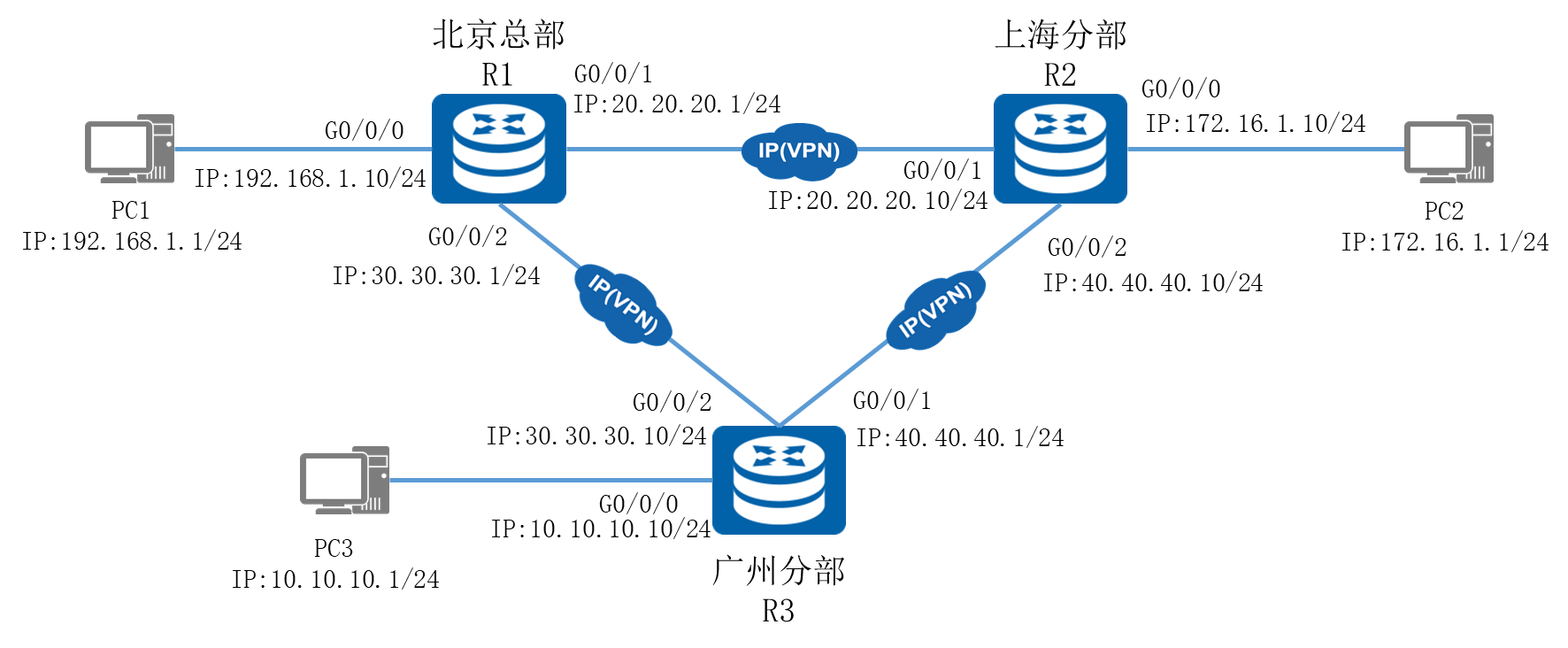
图1 网络拓扑图
2.项目规划设计
北京总部使用192.168.1.0网段,上海分部使用172.16.1.0网段,广州分部使用10.10.10.0网段,R1与R2之间为20.20.20.0网段,R1与R3之间为30.30.30.0网段,R2与R3之间为40.40.40.0网段,所有网段均使用24位子网掩码。路由器配置相应的静态路由,使所有计算机均能互访。
配置步骤如下:
- 配置路由器接口
- 配置静态路由
- 配置各计算机的IP地址
具体规划如下表:
表1 IP地址规划表
设备 |
接口 |
IP地址 |
R1 |
G0/0/0 |
192.168.1.10/24 |
R1 |
G0/0/1 |
20.20.20.1/24 |
R1 |
G0/0/2 |
30.30.30.1/24 |
R2 |
G0/0/0 |
172.16.1.10/24 |
R2 |
G0/0/1 |
20.20.20.10/24 |
R2 |
G0/0/2 |
40.40.40.10/24 |
R3 |
G0/0/0 |
10.10.10.10/24 |
R3 |
G0/0/1 |
40.40.40.1/24 |
R3 |
G0/0/2 |
30.30.30.10/24 |
PC1 |
E0/0/1 |
192.168.1.1/24 |
PC2 |
E0/0/1 |
172.16.1.1/24 |
PC3 |
E0/0/1 |
10.10.10.1/24 |
表2 端口规划表
本端设备 |
接口 |
端口IP地址 |
对端设备 |
R1 |
G0/0/0 |
192.168.1.10/24 |
PC1 |
R1 |
G0/0/1 |
20.20.20.1/24 |
R2 |
R1 |
G0/0/2 |
30.30.30.1/24 |
R3 |
R2 |
G0/0/0 |
172.16.1.10/24 |
PC2 |
R2 |
G0/0/1 |
20.20.20.10/24 |
R1 |
R2 |
G0/0/2 |
40.40.40.10/24 |
R3 |
R3 |
G0/0/0 |
10.10.10.10/24 |
PC3 |
R3 |
G0/0/1 |
40.40.40.1/24 |
R2 |
R3 |
G0/0/2 |
30.30.30.10/24 |
R1 |
PC1 |
E0/0/1 |
192.168.1.1/24 |
R1 |
PC2 |
E0/0/1 |
172.16.1.1/24 |
R2 |
PC3 |
E0/0/1 |
10.10.10.1/24 |
R3 |
表3 路由规划表
路由器 |
目的网段 |
下一跳地址 |
R1 |
172.16.1.0/24 |
20.20.20.10 |
R1 |
10.10.10.0/24 |
30.30.30.10 |
R2 |
192.168.1.0/24 |
30.30.30.1 |
R2 |
10.10.10.0/24 |
40.40.40.1 |
R3 |
192.168.1.0/24 |
30.30.30.1 |
R3 |
172.16.1.0/24 |
40.40.40.10 |
3.项目实施
(1)配置略
(2)配置各计算机的IP地址
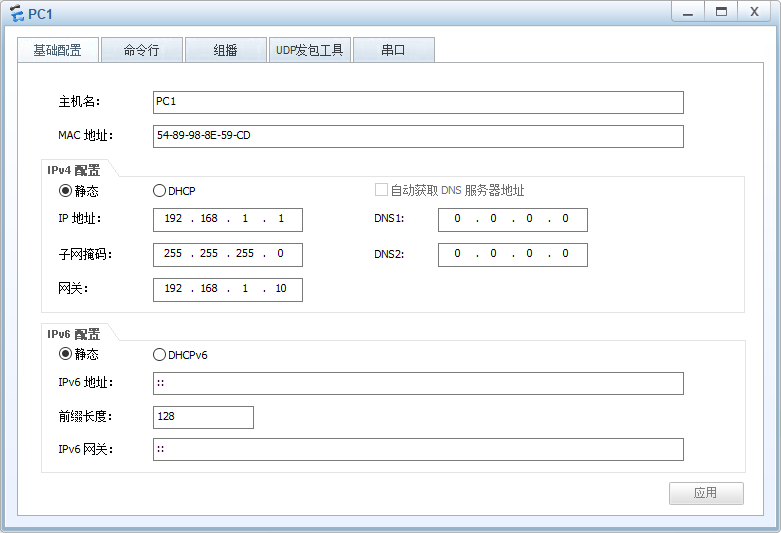
图2 PC1 IP配置图
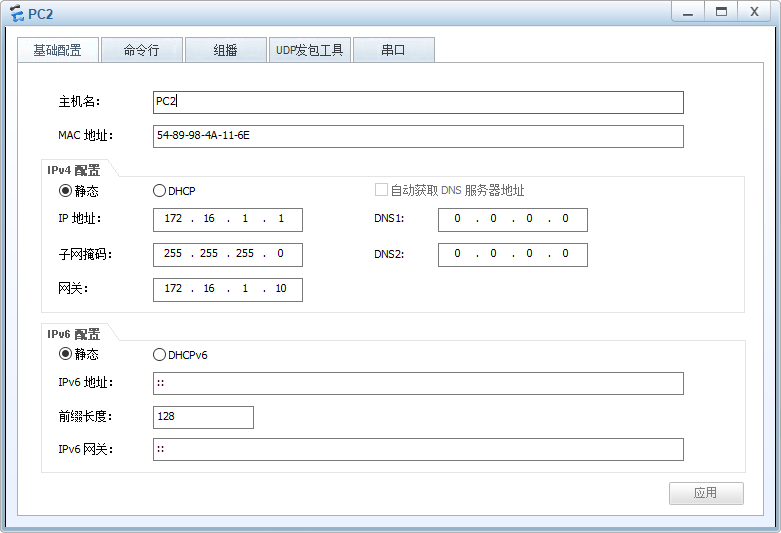
图3 PC2 IP配置图
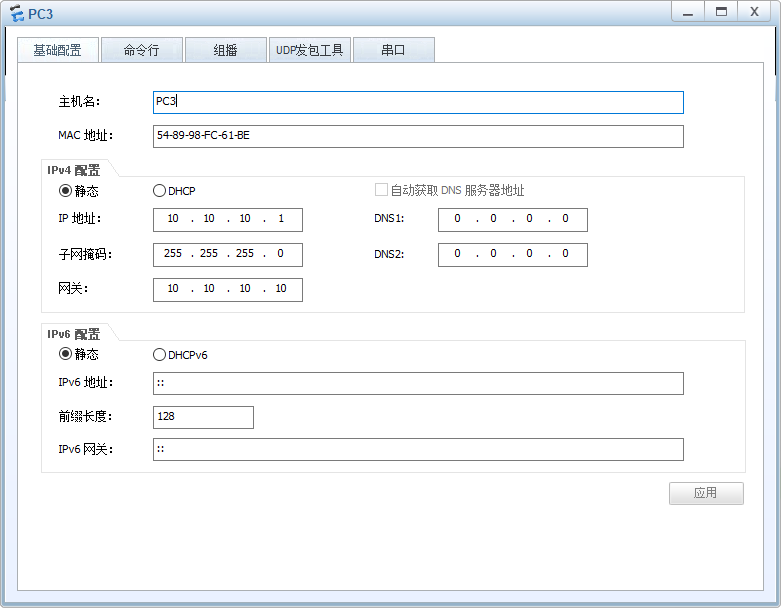
图4 PC3 IP配置图
4.项目验证
(1)验证路由器上路由表的配置信息
- R1的配置
|
[R1]display ip routing-table Route Flags: R - relay, D - download to fib ------------------------------------------------------------------------------ Routing Tables: Public Destinations : 15 Routes : 15 Destination/Mask Proto Pre Cost Flags NextHop Interface 10.10.10.0/24 Static 60 0 RD 30.30.30.10 GigabitEthernet0/0/2 …… 172.16.1.0/24 Static 60 0 RD 20.20.20.10 GigabitEthernet0/0/1 |
- R2的配置
|
[R2]display ip routing-table Route Flags: R - relay, D - download to fib ------------------------------------------------------------------------------ Routing Tables: Public Destinations : 15 Routes : 15 Destination/Mask Proto Pre Cost Flags NextHop Interface 10.10.10.0/24 Static 60 0 RD 40.40.40.1 GigabitEthernet0/0/2 …… 192.168.1.0/24 Static 60 0 RD 20.20.20.1 GigabitEthernet0/0/1 |
- R3的配置
|
[R3]display ip routing-table Route Flags: R - relay, D - download to fib ------------------------------------------------------------------------------ Routing Tables: Public Destinations : 15 Routes : 15 Destination/Mask Proto Pre Cost Flags NextHop Interface …… 172.16.1.0/24 Static 60 0 RD 40.40.40.10 GigabitEthernet0/0/1 192.168.1.0/24 Static 60 0 RD 30.30.30.1 GigabitEthernet0/0/2 |
(2)测试各计算机的互通性
通过Ping命令,测试各计算机内部通信息的情况。
使用PC1 Ping PC2的计算机:
|
PC>ping 172.16.1.1 Ping 172.16.1.1: 32 data bytes, Press Ctrl_C to break From 172.16.1.1: bytes=32 seq=1 ttl=126 time=15 ms From 172.16.1.1: bytes=32 seq=2 ttl=126 time=16 ms From 172.16.1.1: bytes=32 seq=3 ttl=126 time=16 ms From 172.16.1.1: bytes=32 seq=4 ttl=126 time=15 ms From 172.16.1.1: bytes=32 seq=5 ttl=126 time=16 ms --- 172.16.1.1 ping statistics --- 5 packet(s) transmitted 5 packet(s) received 0.00% packet loss round-trip min/avg/max = 15/15/16 ms |
使用PC1 Ping PC3的计算机:
|
PC>ping 10.10.10.1 Ping 10.10.10.1: 32 data bytes, Press Ctrl_C to break From 10.10.10.1: bytes=32 seq=1 ttl=126 time=15 ms From 10.10.10.1: bytes=32 seq=2 ttl=126 time=32 ms From 10.10.10.1: bytes=32 seq=3 ttl=126 time=15 ms From 10.10.10.1: bytes=32 seq=4 ttl=126 time=16 ms From 10.10.10.1: bytes=32 seq=5 ttl=126 time=15 ms --- 10.10.10.1 ping statistics --- 5 packet(s) transmitted 5 packet(s) received 0.00% packet loss round-trip min/avg/max = 15/18/32 ms |
可以看出,各计算机可以互相通信。