基于RSTP的可靠网络配置
1.项目背景
Jan16公司为提高网络的可靠性,使用了两台高性能交换机作为核心交换机,接入层交换机与核心层交换机互联,形成冗余结构,拓扑如图1所示,具体要求如下:
- 为避免交换环路问题,需配置交换机的RSTP功能,加快网络拓扑收敛。要求核心交换机有较高优先级,SW1为根交换机,SW2为备用根交换机,SW1-SW3和SW1-SW4为主链路;
- 技术部使用VLAN10,网络地址为10.0.1/24,PC1和PC2分别接入到SW3和SW4。
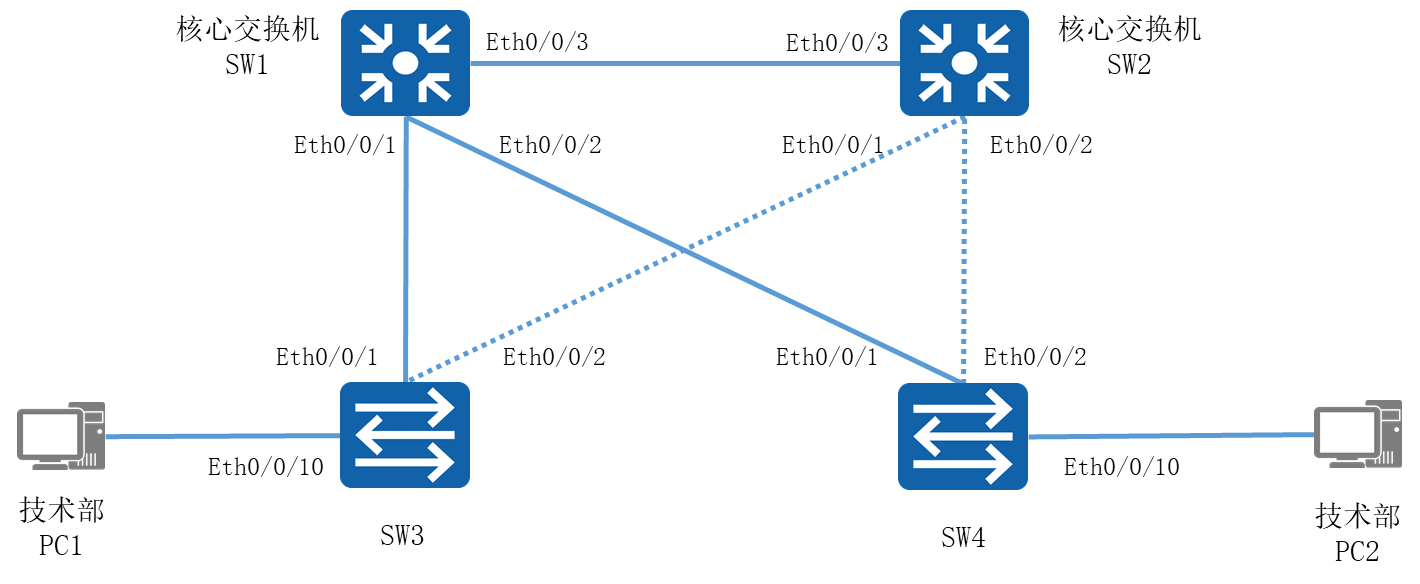
图1-1 网络拓扑图
2.项目规划设计
内部局域网中SW1和SW2为核心交换机,其中将SW1配置为根交换机,SW2为备用根交换机;SW3和SW4作为接入交换机,其中SW1-SW3及SW1-SW4的链路由主链路,SW2-SW4及SW2-SW3的2条链路作为备用链路。故在STP配置中需将SW1的优先级设为最高,SW2的优先级为次高,即SW1的优先级为0,SW2的优先级为4096。将连接终端计算机的交换机端口配置为边缘端口,以加速网络的收敛。同时,技术部的计算机划分在VLAN10的网段内,且计算机连接在不同的交换机上,故交换机之间的链路需配置为Trunk模式。
具体配置步骤如下:
- 创建VLAN
- 将端口划分至相应VLAN
- 启开STP
- 配置RSTP优先级
- 配置边缘端口
- 配置各部门计算机的IP地址
具体规划如下表:
表1-1 VLAN规划表
VLAN ID |
VLAN描述信息 |
IP地址段 |
用途 |
Vlan10 |
Technical |
10.0.1.1-10/24 |
技术部 |
表1-2 端口规划表
本端设备 |
端口号 |
端口类型 |
所属VLAN |
对端设备 |
SW1 |
E0/0/1 |
Trunk |
SW3 |
|
SW1 |
E0/0/2 |
Trunk |
SW4 |
|
SW1 |
E0/0/3 |
Trunk |
SW2 |
|
SW2 |
E0/0/1 |
Trunk |
SW3 |
|
SW2 |
E0/0/2 |
Trunk |
SW4 |
|
SW2 |
E0/0/3 |
Trunk |
SW1 |
|
SW3 |
E0/0/1 |
Trunk |
SW1 |
|
SW3 |
E0/0/2 |
Trunk |
SW2 |
|
SW3 |
E0/0/10 |
Access |
Vlan 10 |
技术部PC1 |
SW4 |
E0/0/1 |
Trunk |
SW1 |
|
SW4 |
E0/0/2 |
Trunk |
SW2 |
|
SW4 |
E0/0/10 |
Access |
Vlan 10 |
技术部PC1 |
表1-3 IP地址规划表
计算机 |
IP地址 |
技术部PC1 |
10.0.1.1/24 |
技术部PC2 |
10.0.1.2/24 |
3.项目实施
(1)配置略
(2)配置各部门计算机的IP地址
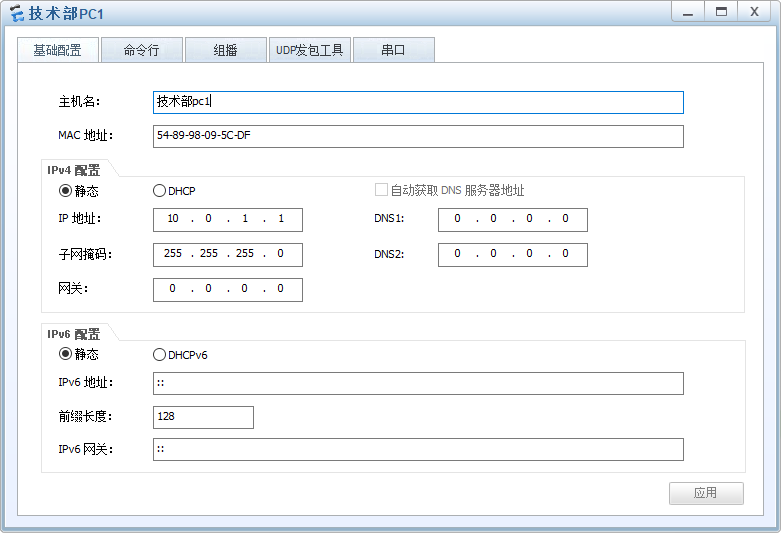
图1-2 技术部-PC1 IP配置图
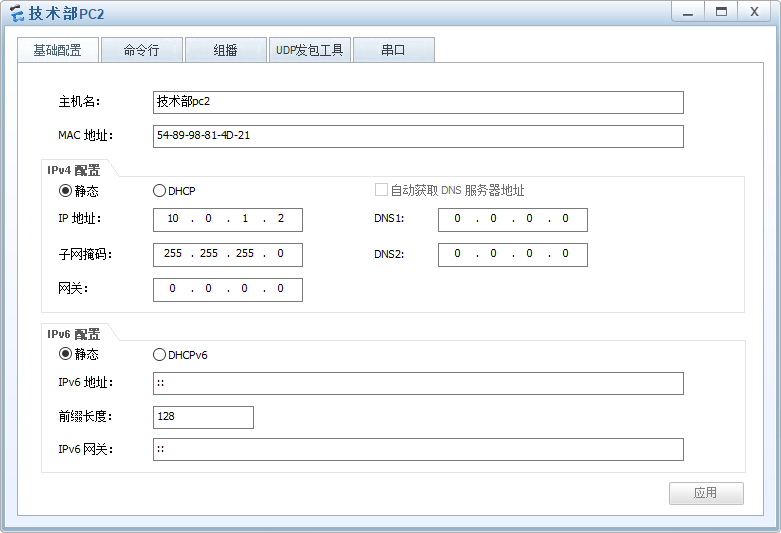
图1-3 技术部-PC2 IP配置图
4.项目验证
(1)验证各交换机的VLAN配置信息
- SW1的配置
|
[SW1]dis vlan The total number of vlans is : 2 ------------------------------------------------------------------------------- U: Up; D: Down; TG: Tagged; UT: Untagged; MP: Vlan-mapping; ST: Vlan-stacking; #: ProtocolTransparent-vlan; *: Management-vlan; ------------------------------------------------------------------------------- VID Type Ports ------------------------------------------------------------------------------- 1 common UT:Eth0/0/1(U) Eth0/0/2(U) Eth0/0/3(U) Eth0/0/4(D) Eth0/0/5(D) Eth0/0/6(D) Eth0/0/7(D) Eth0/0/8(D) Eth0/0/9(D) Eth0/0/10(D) Eth0/0/11(D) Eth0/0/12(D) Eth0/0/13(D) Eth0/0/14(D) Eth0/0/15(D) Eth0/0/16(D) Eth0/0/17(D) Eth0/0/18(D) Eth0/0/19(D) Eth0/0/20(D) Eth0/0/21(D) Eth0/0/22(D) GE0/0/1(D) GE0/0/2(D) 10 common TG:Eth0/0/1(U) Eth0/0/2(U) Eth0/0/3(U) VID Status Property MAC-LRN Statistics Description ------------------------------------------------------------------------------- 1 enable default enable disable VLAN 0001 10 enable default enable disable Technical |
- SW2的配置
|
[SW2]dis vlan The total number of vlans is : 2 ------------------------------------------------------------------------------- U: Up; D: Down; TG: Tagged; UT: Untagged; MP: Vlan-mapping; ST: Vlan-stacking; #: ProtocolTransparent-vlan; *: Management-vlan; ------------------------------------------------------------------------------- VID Type Ports ------------------------------------------------------------------------------- 1 common UT:Eth0/0/1(U) Eth0/0/2(U) Eth0/0/3(U) Eth0/0/4(D) Eth0/0/5(D) Eth0/0/6(D) Eth0/0/7(D) Eth0/0/8(D) Eth0/0/9(D) Eth0/0/10(D) Eth0/0/11(D) Eth0/0/12(D) Eth0/0/13(D) Eth0/0/14(D) Eth0/0/15(D) Eth0/0/16(D) Eth0/0/17(D) Eth0/0/18(D) Eth0/0/19(D) Eth0/0/20(D) Eth0/0/21(D) Eth0/0/22(D) GE0/0/1(D) GE0/0/2(D) 10 common TG:Eth0/0/1(U) Eth0/0/2(U) Eth0/0/3(U) VID Status Property MAC-LRN Statistics Description ------------------------------------------------------------------------------- 1 enable default enable disable VLAN 0001 10 enable default enable disable Technical |
- SW3的配置
|
[SW3]dis vlan The total number of vlans is : 2 ------------------------------------------------------------------------------- U: Up; D: Down; TG: Tagged; UT: Untagged; MP: Vlan-mapping; ST: Vlan-stacking; #: ProtocolTransparent-vlan; *: Management-vlan; ------------------------------------------------------------------------------- VID Type Ports ------------------------------------------------------------------------------- 1 common UT:Eth0/0/1(U) Eth0/0/2(U) Eth0/0/3(D) Eth0/0/4(D) Eth0/0/5(D) Eth0/0/6(D) Eth0/0/7(D) Eth0/0/8(D) Eth0/0/9(D) Eth0/0/11(D) Eth0/0/12(D) Eth0/0/13(D) Eth0/0/14(D) Eth0/0/15(D) Eth0/0/16(D) Eth0/0/17(D) Eth0/0/18(D) Eth0/0/19(D) Eth0/0/20(D) Eth0/0/21(D) Eth0/0/22(D) GE0/0/1(D) GE0/0/2(D) 10 common UT:Eth0/0/10(U) TG:Eth0/0/1(U) Eth0/0/2(U) VID Status Property MAC-LRN Statistics Description ------------------------------------------------------------------------------- 1 enable default enable disable VLAN 0001 10 enable default enable disable Technical |
- SW4的配置
|
[SW4]dis vlan The total number of vlans is : 2 ------------------------------------------------------------------------------- U: Up; D: Down; TG: Tagged; UT: Untagged; MP: Vlan-mapping; ST: Vlan-stacking; #: ProtocolTransparent-vlan; *: Management-vlan; ------------------------------------------------------------------------------- VID Type Ports ------------------------------------------------------------------------------- 1 common UT:Eth0/0/1(U) Eth0/0/2(U) Eth0/0/3(D) Eth0/0/4(D) Eth0/0/5(D) Eth0/0/6(D) Eth0/0/7(D) Eth0/0/8(D) Eth0/0/9(D) Eth0/0/11(D) Eth0/0/12(D) Eth0/0/13(D) Eth0/0/14(D) Eth0/0/15(D) Eth0/0/16(D) Eth0/0/17(D) Eth0/0/18(D) Eth0/0/19(D) Eth0/0/20(D) Eth0/0/21(D) Eth0/0/22(D) GE0/0/1(D) GE0/0/2(D) 10 common UT:Eth0/0/10(U) TG:Eth0/0/1(U) Eth0/0/2(U) VID Status Property MAC-LRN Statistics Description ------------------------------------------------------------------------------- 1 enable default enable disable VLAN 0001 10 enable default enable disable Technical |
(2)查看各交换机的STP状态
查看各交换机STP状态信息,SW1、SW2使用display stp命令查看stp模式是否正确,SW3、SW4使用display stp brief命令查看备用端口是否处于Discarding状态。
- SW1的配置
|
[SW1]display stp -------[CIST Global Info][Mode RSTP]------- CIST Bridge :32768.4c1f-cc91-20c7 Config Times :Hello 2s MaxAge 20s FwDly 15s MaxHop 20 Active Times :Hello 2s MaxAge 20s FwDly 15s MaxHop 20 CIST Root/ERPC :32768.4c1f-cc52-2ca1 / 200000 CIST RegRoot/IRPC :32768.4c1f-cc91-20c7 / 0 …… |
- SW2的配置
|
[SW2]display stp -------[CIST Global Info][Mode RSTP]------- CIST Bridge :32768.4c1f-cc8a-17ba Config Times :Hello 2s MaxAge 20s FwDly 15s MaxHop 20 Active Times :Hello 2s MaxAge 20s FwDly 15s MaxHop 20 CIST Root/ERPC :32768.4c1f-cc52-2ca1 / 200000 CIST RegRoot/IRPC :32768.4c1f-cc8a-17ba / 0 …… |
- SW3的配置
|
[SW3]display stp brief MSTID Port Role STP State Protection 0 Ethernet0/0/1 ROOT FORWARDING NONE 0 Ethernet0/0/2 ALTE DISCARDING NONE 0 Ethernet0/0/10 DESI FORWARDING NONE |
- SW4的配置
|
[SW4]display stp brief MSTID Port Role STP State Protection 0 Ethernet0/0/1 ROOT FORWARDING NONE 0 Ethernet0/0/2 ALTE DISCARDING NONE 0 Ethernet0/0/10 DESI FORWARDING NONE |
(3)测试各部门计算机的互通性
通过Ping命令,测试各部门内部通信息的情况。
使用技术部计算机PC1 Ping本部门的计算机PC2:
|
PC>ping 10.0.1.2 Ping 10.0.1.2: 32 data bytes, Press Ctrl_C to break From 10.0.1.2: bytes=32 seq=1 ttl=128 time=63 ms From 10.0.1.2: bytes=32 seq=2 ttl=128 time=62 ms From 10.0.1.2: bytes=32 seq=3 ttl=128 time=47 ms From 10.0.1.2: bytes=32 seq=4 ttl=128 time=62 ms From 10.0.1.2: bytes=32 seq=5 ttl=128 time=47 ms --- 10.0.1.2 ping statistics --- 5 packet(s) transmitted 5 packet(s) received 0.00% packet loss round-trip min/avg/max = 47/56/63 ms |
(4)模拟根端口断掉过程
查看SW3端口角色及状态
|
[SW3]dis stp brief MSTID Port Role STP State Protection 0 Ethernet0/0/1 ROOT FORWARDING NONE 0 Ethernet0/0/2 ALTE DISCARDING NONE 0 Ethernet0/0/10 DESI FORWARDING NONE |
把SW3的E0/0/1端口使用shutdown关闭,同时使用display stp brief命令观察SW2其他端口角色及状态变化。
|
[SW3]interface E0/0/1 [SW3-Ethernet0/0/1]shutdown |
使用display stp brief 观察SW3其他端口的角色及状态变化。
|
[SW3-Ethernet0/0/1]display stp brief MSTID Port Role STP State Protection 0 Ethernet0/0/2 ROOT FORWARDING NONE 0 Ethernet0/0/10 DESI FORWARDING NONE |
可以发现,当拓扑发生变化时,RSTP根端口快速切换机制使端口状态即从Discarding进入Forwarding状态,缩短收敛的时间,减少了对网络通信的影响。